
Forty hours a week. That is a full-time employee’s worth of time, and for a huge number of small businesses, it is being quietly swallowed by repetitive work that no longer needs a human at all. This AI automation case study walks through exactly how a small business can claw back that time, where the hours actually hide, which automations remove them, and what the week looks like on the other side. It is a practical breakdown you can hold up against your own business to see how much of your week is recoverable.
The Starting Point: A Business Drowning in Admin
Picture a busy 12-person professional services firm, the kind that does great work but runs its back office on manual effort and good intentions. The team is talented, but a punishing share of every week disappears into tasks that are repetitive, predictable, and draining. Leads trickle in but sit for hours before anyone replies. The same customer questions get answered over and over. Data gets copied by hand between tools. Reports are built manually, late, on a Friday, by someone who would rather be doing anything else.
None of this is a people problem. The team is busy and capable. It is a systems problem, and it is incredibly common. The work that fills the week is exactly the work that does not need a human touching it, which is the textbook signal that automation will pay off. To understand why, our complete guide on what AI automation is and how it works lays out the foundation.
Where the 40 Hours Were Actually Going
Before changing anything, the first job is always to find where the time goes. Tracked across the team for a week, the repetitive workload added up fast, and the breakdown is where the opportunity becomes obvious.
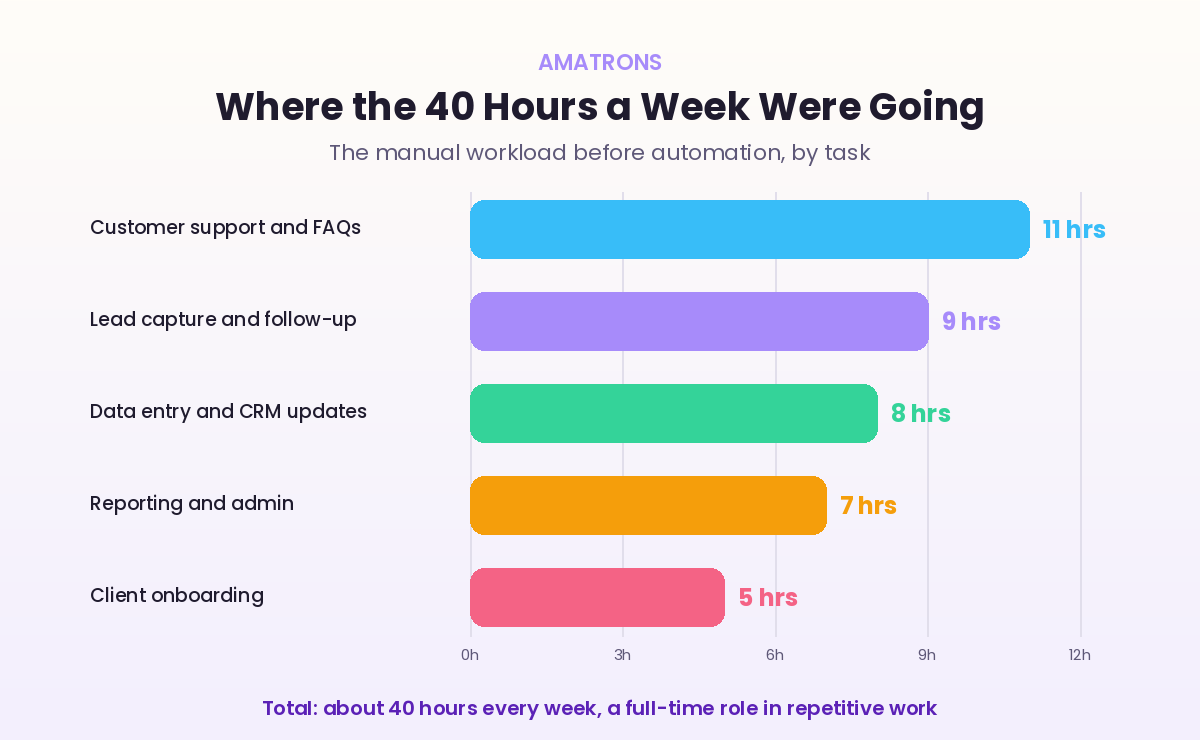
Customer support and answering the same FAQs ate the most, around 11 hours a week. Lead capture and follow-up took another 9. Data entry and CRM updates burned 8. Reporting and general admin took 7, and onboarding new clients took 5. Add it up and it lands near 40 hours every week, a full working week of one person’s time, spent on work that follows the same predictable pattern every single time. That predictability is the gold. It is precisely what AI handles well.
The 5 Automations That Took Over the Work
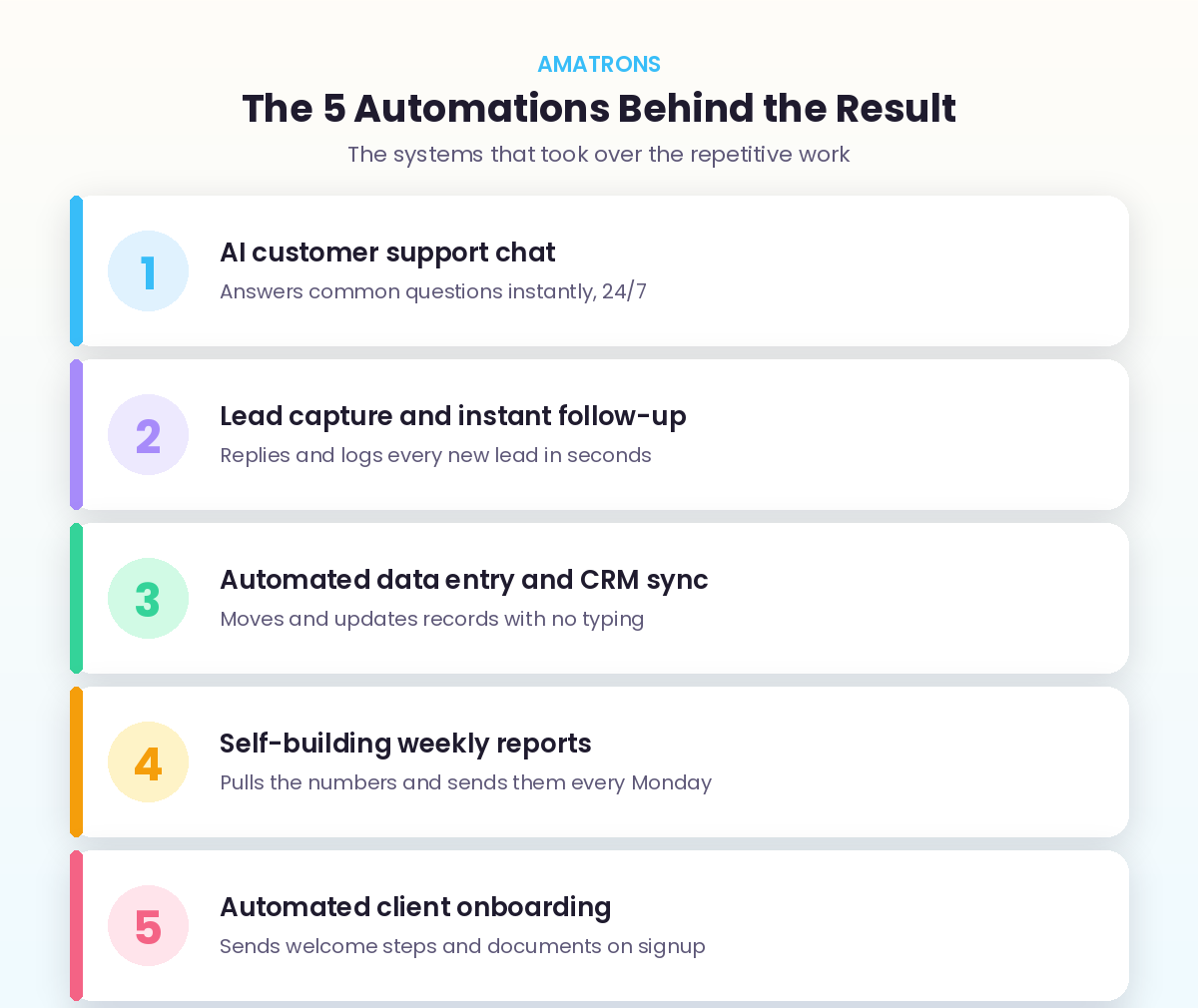
With the hours mapped, the build was straightforward. Rather than trying to automate everything at once, the work was tackled one system at a time, starting with the biggest time drain. Five automations did the heavy lifting.
1. AI Customer Support Chat
An AI chat assistant took over the flood of repeat questions, order status, policies, how-tos, answering them instantly at any hour and only passing genuinely unusual cases to a human with context attached. This alone reclaimed the biggest single block of time. The same approach powers a dedicated AI support bot.
2. Lead Capture and Instant Follow-Up
Every new enquiry now gets read, scored, replied to, and logged within seconds, automatically. No lead waits hours for attention, and none slip through the cracks. Because most buyers reward the first business to respond, this did more than save time, it started winning more of the leads coming in.
3. Automated Data Entry and CRM Sync
The endless copying of information between tools was handed to automation. Records now move and update themselves with no manual typing, which removed both the hours and the small errors that crept in whenever a human did it by hand.
4. Self-Building Weekly Reports
Instead of someone manually pulling numbers every Friday, the reporting now builds itself. Data is gathered from across the tools, summarised, and delivered automatically every Monday morning, on time, every time, with no one assigned to remember it.
5. Automated Client Onboarding
When a new client signs, the welcome sequence, documents, and first steps now fire automatically in the right order. The new client gets a smooth, professional start, and the team gets those five hours back. We break this one down fully in our guide on how to automate customer onboarding in 5 steps.
The Result: The Week, Before and After
The change shows up most clearly when you put the two versions of the week side by side. The same business, the same team, a completely different rhythm.
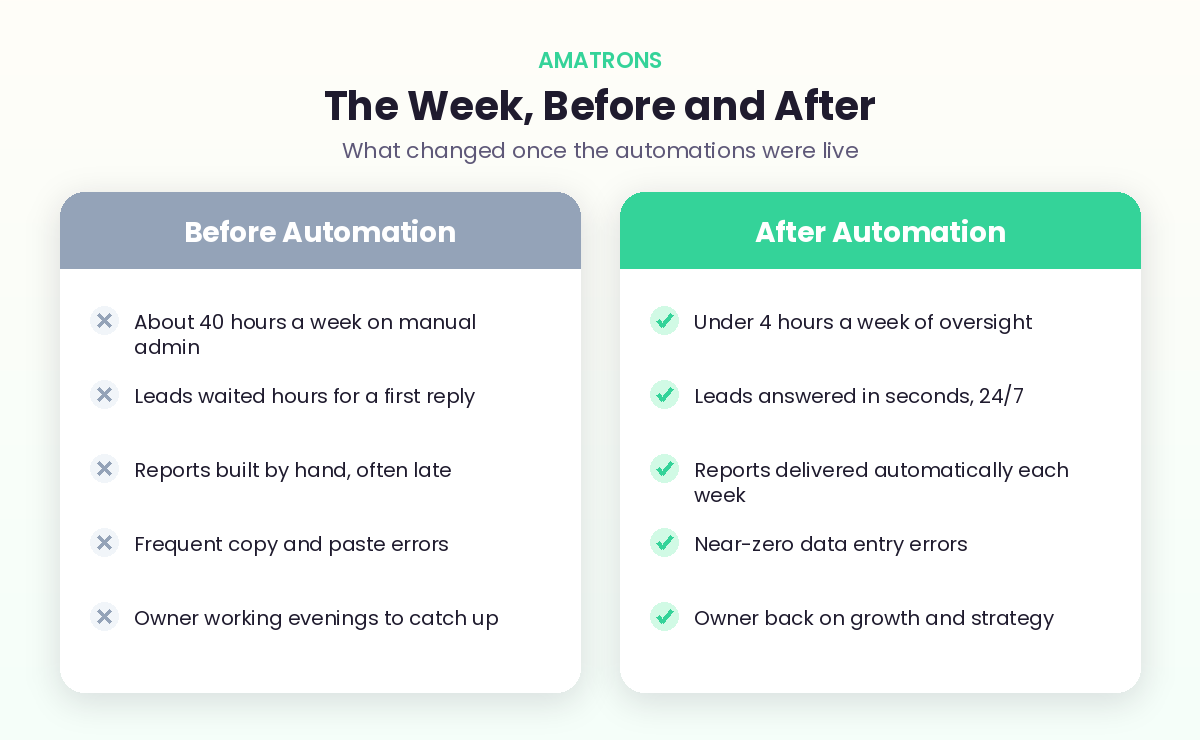
Before, roughly 40 hours a week vanished into manual admin, leads waited hours, reports ran late, errors crept in, and the owner worked evenings just to keep up. After, oversight of the whole system takes under 4 hours a week. Leads are answered in seconds around the clock, reports arrive automatically, data errors all but disappeared, and the owner got their evenings and their focus back. The team did not shrink. The busywork did.
How the System Was Built, Step by Step
One reason this worked, and did not turn into a stalled, half-finished mess, is the order it was built in. Trying to automate all five areas at once is how businesses end up overwhelmed. Instead, it followed a deliberate sequence.
It started with a single week of tracking to find where the time actually went, which produced the breakdown you saw earlier. Then the biggest drain, customer support, was automated first and proven before anything else was touched. Once that was running reliably and the team trusted it, the next biggest drain, lead follow-up, was added. Each automation was tested with real data, refined over a few days, and only then left to run while the next was built. The whole set came together over roughly two weeks, not in one risky push.
That sequencing matters more than the tools. It meant the business saw real time savings within days, which funded the momentum to keep going, and it meant nothing went live until it was trusted. Most AI projects that fail do so from poor planning, not bad technology, a point borne out by global research including the IDC study on AI returns. Build in the right order and you land on the winning side of that statistic.
Why This Works for Almost Any Business
It is easy to assume a result like this only applies to one type of company, but the opposite is true. The specific tasks change from business to business, yet the underlying pattern is almost universal.
A clinic spends its hours on appointment booking, reminders, and patient queries. An agency loses time to client reporting, proposals, and follow-ups. An online store burns it on order questions, returns, and inventory updates. A coach or consultant spends it on scheduling, onboarding, and chasing leads. Different industries, identical shape: a stack of repetitive, predictable tasks that quietly consume a full week of effort. Because AI automation targets the pattern rather than the industry, the same five-step approach in this case study maps onto nearly any small business. The names of the tasks differ, but the 40 hours, and the opportunity to win them back, show up almost everywhere.
What It Cost Versus What It Saved
Time saved only matters if it beats what the system costs, so here is the honest math. Forty hours a week is roughly 2,000 hours a year. Even valued modestly, that is the equivalent of a full salary recovered annually, work that no longer needs a person to sit and do it.
Against that, the cost of a setup like this is small. The tools to run five automations of this kind typically sit in the low hundreds of dollars a month, and the build is a one-time effort. Put simply, the saved time is worth many times the running cost, which is why automations like these usually pay for themselves within the first month or two. This tracks with the wider numbers: large studies have found businesses earn an average of around $3.70 back for every $1 invested in AI. We break those figures down fully in our guide to the real ROI of AI automation, and the global research behind them is covered in McKinsey’s State of AI work.
The Wins That Do Not Show Up in the Hours
The 40 hours is the headline, but some of the most valuable changes never appear on a timesheet. They are worth naming, because they often matter more to the long-term health of the business than the time itself.
- More revenue from faster leads. Answering every enquiry in seconds instead of hours means winning deals that used to go cold or to a quicker competitor. The automation did not just save time, it grew the top line.
- Fewer costly errors. Removing manual data entry removed the quiet tax of fixing mistakes later, along with the awkward customer moments those mistakes caused.
- A better customer experience. Instant answers and a smooth onboarding made the business feel sharper and more professional, the kind of experience that earns repeat business and referrals.
- An owner who can lead again. Handing the busywork to systems gave the owner back the evenings and the headspace to actually run and grow the company instead of just keeping it afloat.
Could Your Business Recover This Much Time?
The honest answer for most small businesses is yes, often more than they expect. The pattern in this case study is not unusual, it is the norm. If your week is full of repetitive questions, manual follow-ups, copying data between tools, and reports built by hand, the hours are sitting there waiting to be reclaimed.
A quick way to check is to do what this business did first: track where your team’s time actually goes for one week. Note every task that is repetitive, rule-based, or data-heavy. The total will usually surprise you, and it points straight at your starting automation. For a fuller menu of where to look, our roundup of the business processes to automate with AI lists the highest-return candidates.
From there, the route is the one this case study followed. Automate the single biggest drain first, prove it works, and reinvest the freed-up time into building the next. If you would rather have the whole system designed, built, and tuned for you so you skip the learning curve entirely, that is exactly what our AI automation and workflow automation services are built to do.
The One Decision That Made It Work
If there is a single takeaway from this case study, it is not about any specific tool. It is about the decision to start small and stay disciplined. The business did not try to transform everything overnight. It picked the one task costing the most time, automated that, proved it, and only then moved on.
That sounds obvious, but it is exactly where most attempts fail. Owners get excited, try to automate ten things at once, get overwhelmed when half of them need tuning, and quietly abandon the whole effort. The businesses that succeed treat it as a sequence, not a single leap. One automation live and trusted is worth more than five half-built ones gathering dust. The 40 hours were not recovered in a heroic week. They were recovered one automation at a time, each one funding the confidence and the freed-up time to build the next. That patience, more than any clever tool, is what separates the businesses that win back their week from the ones that keep meaning to.
Frequently Asked Questions
Is this AI automation case study based on a real business?
How can a business realistically save 40 hours a week with AI?
How long does it take to set up automations like these?
Which automation should a business start with?
Does saving 40 hours a week mean cutting staff?
The Bottom Line
The lesson in this AI automation case study is not really about one business. It is about a pattern that fits almost every small business: a huge chunk of the week is spent on predictable, repetitive work that AI can now handle, freeing the team to do the work that actually grows the company. The path is always the same. Find where your hours go, automate the biggest drain first, prove it, then build out the rest. You do not need to recover all 40 hours in week one. You need to recover the first five, see what that feels like, and keep going.