
There are hundreds of AI tools out there, and most of them will waste your money. Not because they are bad, but because they are wrong for your business or wrong for the job in front of you. The trick is not finding the most powerful tool. It is finding the right one for the task you actually need to fix. This guide cuts through the noise and shows you the best AI automation tools for small businesses in 2026, what each one is genuinely good at, what it costs, and how to put together a stack that fits your budget instead of draining it.
Every tool here is one a five-person team can run without a developer. We will start with the categories so you know what you are even looking at, then go tool by tool, and finish with a starter stack you can copy depending on what you want to spend.
The 5 Types of AI Automation Tools
Before you pick a tool, understand the category it belongs to. Most of the confusion around AI automation comes from comparing tools that do completely different jobs. There are five buckets that matter for a small business.
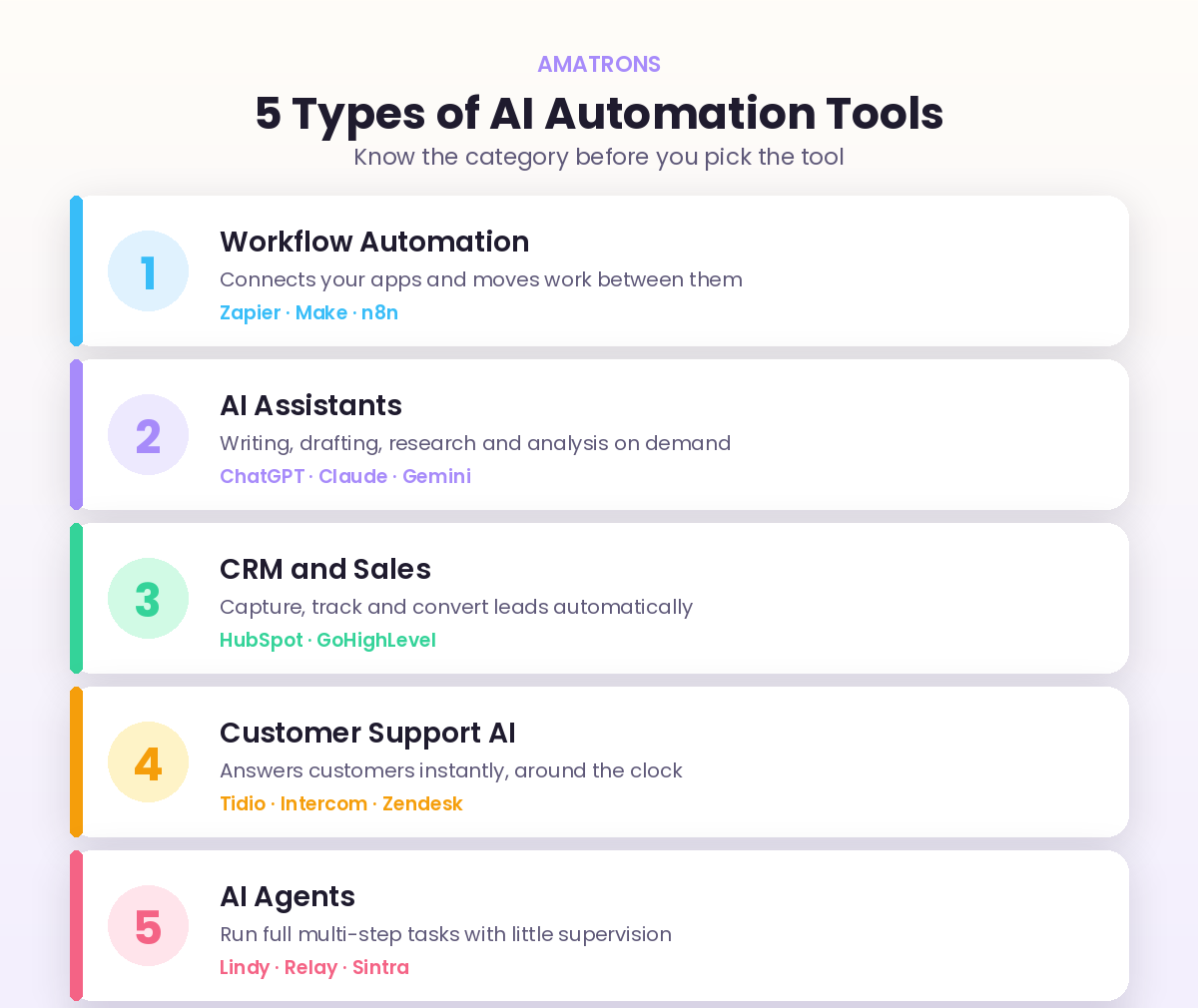
Each category solves a different problem. Workflow tools connect your apps. AI assistants help you think and write. CRMs manage your leads. Support AI answers your customers. And AI agents run whole tasks on their own. Once you know which bucket your problem sits in, choosing the actual tool becomes simple. If you are still deciding what to automate in the first place, our guide on the business processes to automate with AI is the right place to start.
The Best Workflow Automation Tools
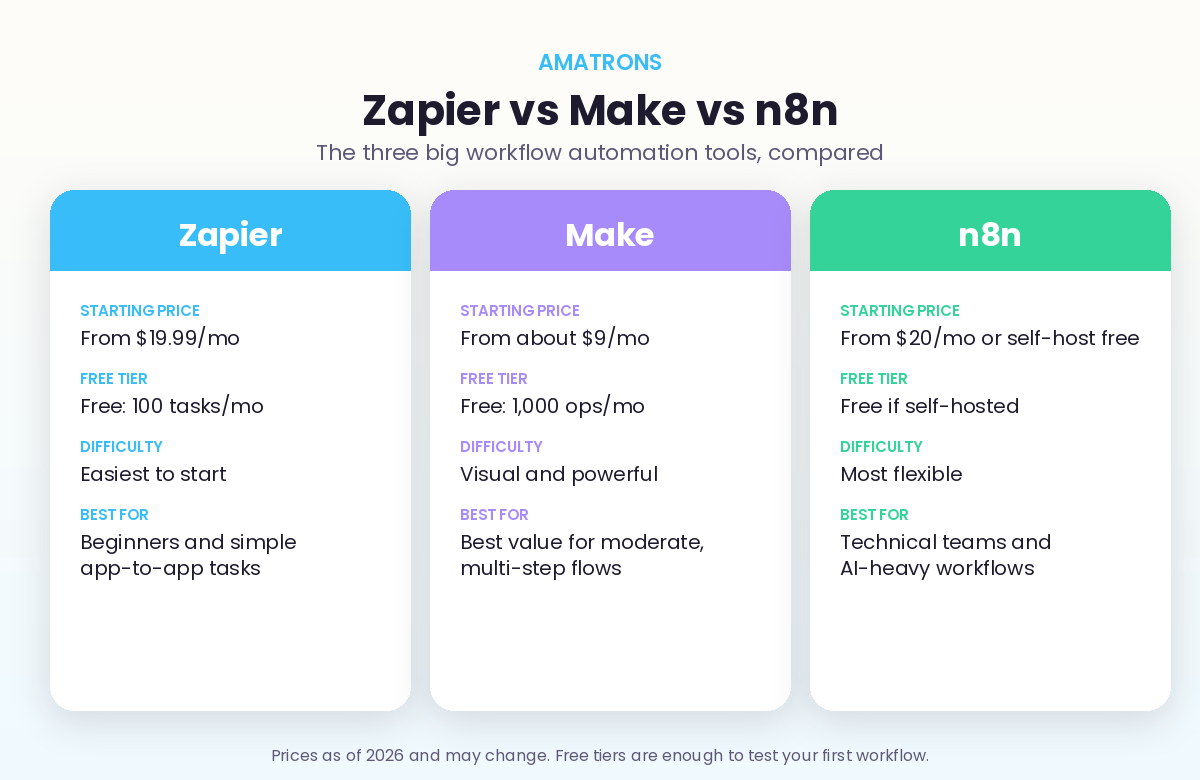
This is the connective tissue of your whole setup, the layer that moves information between your apps and triggers actions automatically. Three tools dominate, and the right one depends on your technical comfort and how complex your workflows get.
Zapier
The easiest place to start. Zapier connects thousands of apps with simple trigger and action rules, and its 2026 AI layer lets you describe what you want in plain English. If you want a new lead to drop into your CRM and fire off a welcome email, you can build it in minutes with zero code.
Make
Make sits between Zapier’s simplicity and full developer tools. Its visual canvas lets you build multi-step workflows with branching, filtering, and data handling that Zapier cannot match, and it is far cheaper at higher volumes. There is a slightly steeper learning curve, but for most growing businesses it is the sweet spot.
n8n
The most powerful of the three and the favourite for AI-heavy workflows. n8n has first-class AI nodes and can be self-hosted for free, which makes it nearly unlimited at scale. The trade-off is that it expects a bit more technical confidence, so it suits teams with someone comfortable tinkering, or an agency setting it up for you.
If you are not sure whether your task even needs the AI side of these tools or just simple rules, our breakdown of AI automation versus traditional automation will save you money by pointing you to the cheaper option when that is all you need.
The Best AI Assistants for Daily Work
These are the general-purpose AI tools that handle writing, research, summarising, and thinking out loud. They are the cheapest, highest-leverage tools on this list, and most businesses should have at least one.
ChatGPT and Claude
Both are excellent for drafting emails, writing first versions of content, summarising long documents, and working through problems. ChatGPT is the most widely used and has the largest ecosystem. Claude is known for thoughtful long-form writing and handling big documents. Many owners keep both open and pick whichever fits the task.
The Best CRM and Sales Automation Tools
Your CRM is where leads live, and a modern one does far more than store contacts. It scores leads, drafts follow ups, and keeps your pipeline moving on its own.
HubSpot and GoHighLevel
HubSpot offers a genuinely useful free CRM with AI features built in, then scales up as you grow, which makes it the safe default for most small businesses. GoHighLevel is an all-in-one favourite among agencies and service businesses, bundling CRM, funnels, email, and booking into a single platform. Pick HubSpot for flexibility and a free start, GoHighLevel if you want everything in one place.
The Best Customer Support AI Tools
If your team answers the same questions all day, a support AI pays for itself fast. These tools handle the repetitive queries instantly and pass the tricky ones to a human with context attached.
Tidio, Intercom and Zendesk
Tidio is the friendliest entry point for small businesses, pairing live chat with an AI bot that resolves common questions on its own. Intercom and Zendesk are more powerful platforms suited to teams with higher support volume that need full ticketing and omnichannel coverage. Start with Tidio if you are small, and graduate to the others as your volume climbs.
The Best AI Agent Tools (The New Wave)
This is the newest and fastest-moving category. AI agents go beyond simple rules. They take a goal, plan the steps, and carry out multi-stage tasks with little supervision, things like researching a lead, drafting a tailored reply, and logging the result all in one run.
Lindy, Relay and Sintra
Lindy and Relay let you build AI agents that handle real workflows like inbox management and lead research. Sintra positions itself as an all-in-one team of AI assistants for marketing, support, and operations. This category is improving monthly, so it is worth watching closely, but be sure to test carefully before you trust an agent with anything customer-facing.
How to Choose the Right Tool for Your Business
With so many options, the choice gets simple if you ask the right questions in the right order. Run any tool through these before you commit.
- What is the one task you are trying to fix? Start with the problem, never the tool. The task tells you the category.
- How technical are you? Be honest. Zapier and Tidio for non-technical, Make for a middle ground, n8n if you have technical help.
- Does it connect to the apps you already use? A tool that does not talk to your current systems is useless, no matter how good it looks.
- Is there a free tier to test on? Almost every tool here has one. Never pay before you have proven the workflow works.
A Recommended Starter Stack by Budget
You do not need every tool. You need the right few for where you are now. Here is a simple stack you can copy, scaling up only as the returns come in.
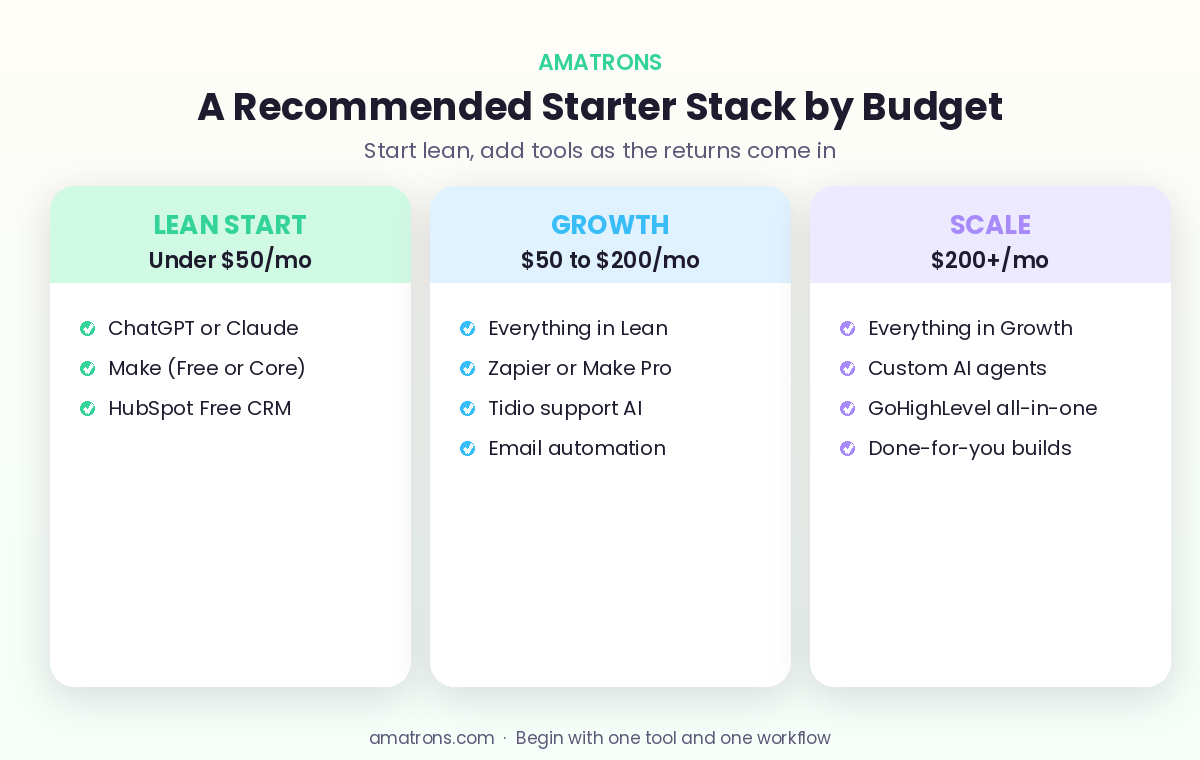
The lean start tier proves the value with almost no spend. The growth tier adds reach once you have seen the first results. And the scale tier is where custom AI agents and done-for-you builds take over the heavy lifting. Crucially, every tier is funded by the returns of the one before it. As we covered in our look at the ROI of AI automation, the businesses that win start small, measure the result, and let each win pay for the next step. If wiring it all together is not how you want to spend your week, that is exactly what our workflow automation service handles for you.
Mistakes to Avoid When Choosing AI Automation Tools
The wrong tool choice is rarely about the software being bad. It is almost always about how it was picked. Sidestep these four traps and you will save both money and a lot of frustration.
- Buying for features you will never use. The most powerful tool is not the best tool. A simple one you actually use beats a complex one that sits idle. Match the tool to your real needs, not the longest feature list.
- Stacking too many tools at once. Five half-configured tools deliver less than one that runs perfectly. Get a single workflow live and working before you add the next.
- Ignoring the true cost. The monthly price is only part of it. Setup time, learning curve, and the hidden way some tools count usage can turn a cheap plan into an expensive one. Read how pricing actually works before you commit.
- Skipping the free trial. Almost every tool here lets you test for free. Prove the workflow saves time on your real data before any money changes hands.
How to Set Up Your First Automation This Week
Reading about tools is easy. The value only shows up when something is live and running. Here is a simple path to your first working automation in a few days, not a few months.
- Name the task. Pick the single thing you do most often that follows the same steps each time. Lead follow up, data entry, and appointment reminders are common first wins.
- Pick one tool from the right category. For most first automations, that means a free Zapier or Make account. Do not overthink this part.
- Map it on paper. Write the trigger and the actions in plain words. When this happens, do that, then that. Clarity here makes the build effortless.
- Build the simplest version. One trigger, one or two actions. Resist the urge to make it clever. A small automation that runs beats a big one that never ships.
- Test with real data and refine. Run a few real cases through it, watch the output, and fix anything off. Once you trust it, let it run and move to the next task.
That first automation is the most important one you will ever build, because it proves the whole idea to you. Once you see hours come back with no extra effort, the next ones get far easier to justify and far quicker to set up.
What These Tools Look Like Working Together
Individual tools are useful. The real power shows up when they work as a system, each handling the part it does best. Here is what that looks like in practice for a typical small business.
A new lead fills in a form on your website. Make catches it and creates a record in your HubSpot CRM. ChatGPT or Claude, plugged into the workflow, reads what the lead wrote and drafts a tailored reply in your voice. The CRM sends it within seconds and books a call based on your real availability. If the lead has a question while browsing, Tidio answers it instantly. And if they go quiet, an automated email nudges them a few days later. No single tool does all of this. Together, they run your entire front end without you touching it.
That is the mindset shift worth taking away from this whole guide. You are not buying one magic tool. You are assembling a small set of tools into a system that runs quietly in the background. Start with one piece, get it working, then connect the next. Built step by step, this is how a solo founder ends up operating like a team of ten.
Frequently Asked Questions
What is the best AI automation tool for a small business just starting out?
How much do AI automation tools cost for a small business?
Do I need coding skills to use these AI automation tools?
Zapier vs Make: which one should I choose?
What is the difference between an AI assistant and an AI agent?
The Bottom Line
The best AI automation tools for small businesses in 2026 are not the most expensive or the most advanced. They are the ones that fit the task in front of you and the budget you actually have. Start by naming the one process eating your time, find the category it belongs to, and pick the simplest tool that solves it. Use the free tier to prove it works, measure the result, and only then move on to the next. Do that, and you build a lean, powerful stack that grows with you, instead of a drawer full of subscriptions you never use.